
Homelab Timeline
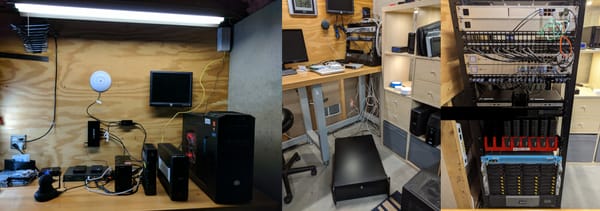
My homelab has grown over the years. As I learn new things it grows. 2016 2017 2018 2019 2020 2021 2022 2023 2024 2025
My homelab has grown over the years. As I learn new things it grows. 2016 2017 2018 2019 2020 2021 2022 2023 2024 2025

homelab
TL;DR - I just setup Orbital Sync on a docker stack to keep my pi-holes in sync. Gravity sync retired by u/ThiefClashRoyale in pihole A post came across my reddit feed that let me know that Gravity Sync has been retired. A replacement that was offered in the

homelab
Setting up a TrueNAS Scale server on bare metal. I purchased a server from eBay and it has been sitting in my rack waiting for me to buy some new HDD. I initially installed Unraid on it, but I already have a functional Unraid server. My first foray into the

homelab
Create a share on Unraid Note the NFS Security Settings * Export: Yes * Security: Private * Rule: *(rw,no_wdelay,crossmnt,no_root_squash,insecure_locks,sec=sys,anonuid=99,anongid=100) From Proxmox Backup Server (PBS) >_Shell # nano /etc/fstab Add the Network File Share (NFS) 10.0.0.10:

homelab
Proxmox is an open-source virtualization platform that allows users to create and manage virtual machines and containers. It is based on the Debian operating system and provides a web-based management interface for creating and configuring virtual environments. Proxmox supports both KVM (Kernel-based Virtual Machine) and LXC (Linux Containers) virtualization technologies,

homelab
CrowdSec is an open-source software that aims to improve the security of Internet-connected devices by collecting and analyzing data from various sources, such as intrusion detection systems, firewalls, and logs, in order to identify and block malicious activity. The CrowdSec Docker image is a pre-configured version of the CrowdSec software
Ubuntu
Intel NUC
Intel NUC
NFS Mounting: How to Mount an NFS Share in Linux sudo apt update sudo apt install nfs-common -y sudo nano /etc/fstab 192.168.10.10:/mnt/user/media /media nfs defaults 0 0 sudo mount -t nfs 192.168.10.10:/mnt/user/media /media

Intel NUC
I am having trouble installing Ubuntu Server 22.04 on my Intel® NUC NUC6i7KYK. The NUC seems to be stuck in a boot loop. No image is showing up on the connected monitor during boot. After about 30 seconds the computer restarts and try's again.

unraid
Final issue I encountered on booting with new hardware. I had to make a change to the name of the "EFI-" folder on the Unraid USB. I renamed the folder to "EFI". This allowed my new motherboard to properly load Unraid. Reference: Allow UEFI Boot

unraid
I was able to flash UEFI firmware on the LSI SAS 9207-8i HBA. I followed the guide here: [Guide] Updating your LSI SAS Controller with a UEFI Motherboard The HBA is not recognized at boot and loads all of the HDDs via the HBA. They now show up in the